Predictive Track
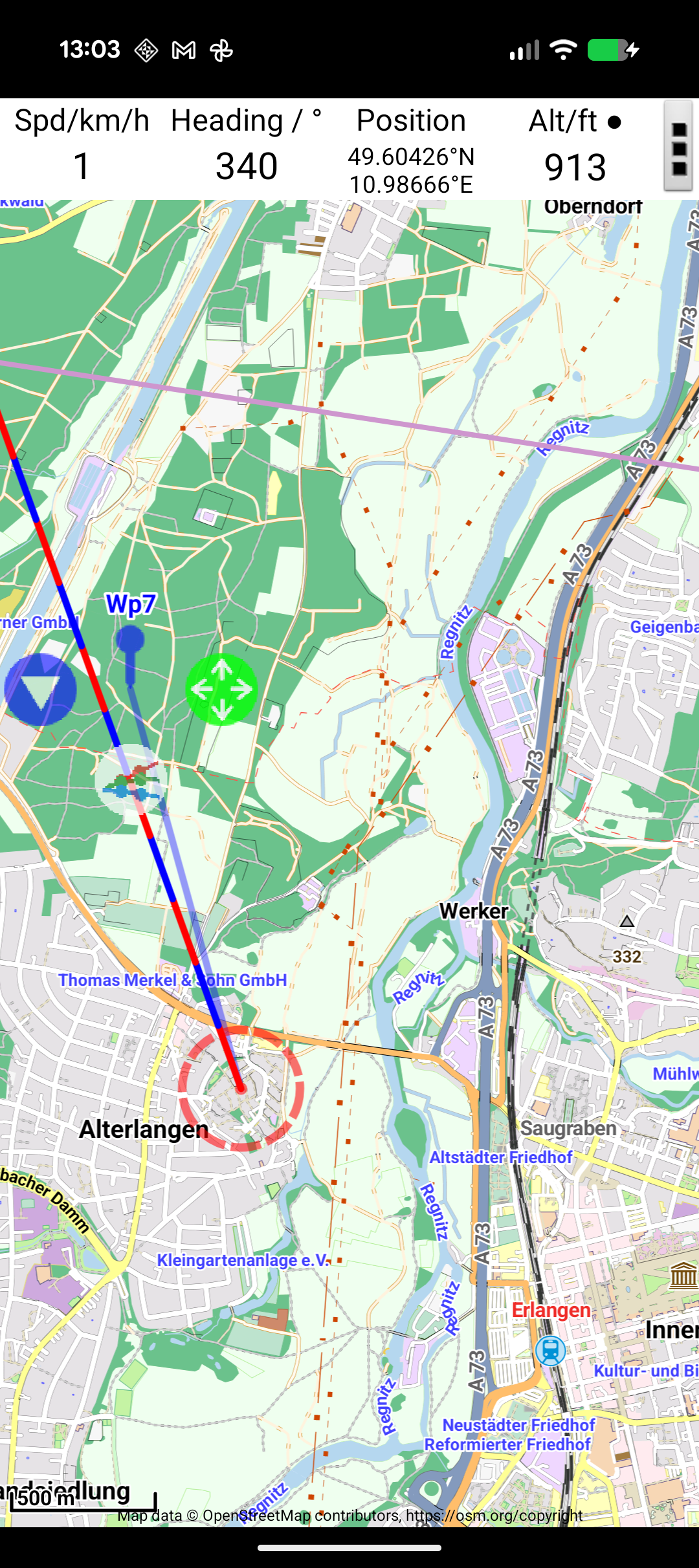
The predictive track is one of JBalloonNav's most useful features. It draws a line ahead of your current position showing where the wind will carry you based on your current speed and direction.
How It Works
The predictive track uses your current ground speed and heading (measured by GPS) to project your future position. It draws a straight-line extension showing where you'll be over the configured time period.
The line alternates colours at regular intervals (by default, every 15 minutes), making it easy to estimate when you'll reach a particular point on the map.
Configuration
In Settings → Tracking:
| Setting | Default | Description |
|---|---|---|
| Predictive Track Length | 15 minutes | How far ahead to project. Each segment of the line represents this time interval. |
Reading the Predictive Line
- Each colour alternation represents one time segment (default 15 minutes)
- Count the segments to estimate time: 2 segments = ~30 minutes at current speed
- The line updates continuously as your speed and heading change
Practical Use
The predictive track is especially useful for:
- Avoiding airspace — see if your current trajectory will take you into restricted areas
- Competition flying — judge whether the wind will carry you toward or past the target
- Landing planning — identify where you'll end up if the wind continues as-is
Note
The predictive track assumes constant wind speed and direction. In practice, wind changes with time and the line is an approximation. For multi-level wind forecasts over longer periods, see Trajectory Forecasts.